
Nobody likes double wood.
Every pole owner has them. Everyone is trying to clean them up. Two poles standing next to each other, one old and one new, because the transfer never finished. One is a headache, a hundred is a problem, and a thousand is the thing that shows up in leadership meetings and state regulator hearings. Double (and unfortunately triple) wood will continue to show up more and more as BEAD dollars hit and aging asset replacement accelerates.
Double wood is the visible symptom of something that runs deeper. Pole transfers are a continuous function on any active grid, and when the management layer around that function is weak, double wood accumulates. Every stub pole still standing is a transfer event that stalled somewhere.
We built Transfer Management to give that work a home.
Transfer Management is a new configuration of Katapult Pro, built for running pole transfers as an ongoing program. It handles the double wood already on your system and every transfer coming next, through one workflow. It can be a one-time cleanup engagement, but it was made to be the operations layer for ongoing transfer and stub removal work.
Here is what it does, how it fits into the programs you already run, and why we built it.
Pole Transfers Are Always Happening
Transfer work is never really finished, because poles are always being replaced.
Aging asset replacement is constant. Make ready driven pole swaps are constant on any utility with active pole attachment programs. Storm damage replacements are constant in regions with bad storms. BEAD-funded network buildouts and reconductoring projects are accelerating replacement volume across the country right now. Every replacement triggers a transfer sequence: power transfers to the new pole first, then each communication attacher transfers in order, then the stub pole gets pulled.
When that sequence runs cleanly, nobody notices. The grid stays clean, the old pole comes down, and the program manager does not hear about it. When the sequence stalls, you get double wood. An attacher that never transferred. A removal crew that never came. A record that never got closed. Multiply that across thousands of replacements over several years, and the double wood inventory on your system is just the running count of every transfer that did not finish.
The usual tools for managing this work are not built for continuous operation. A utility's asset management system records the replacement. An inter-company notification system handles the formal coordination handshake. A field contractor collects data through their own workflow. The pole owner tracks progress in a spreadsheet. None of those systems see the full picture, which means transfers fall through the gaps between them.
The vicious cycle continues when trucks roll to transfer an attachment and the data was wrong. Attachers start ignoring notifications, and the issue worsens. Double wood proliferates and we even start to see triple wood.
Why Managing Transfers as Ongoing Work Matters
Transfer management is not just an operational nicety. The business case runs in two directions.
Unresolved double wood on the system can block new attachment access. Pole owners have the right to deny new applications while transfer work is outstanding on the same facilities, which means every stalled transfer is a roadblock for the next fiber build, the next 5G deployment, the next permit. The double wood on your system today is part of the reason your next round of applications will drag.
Transfer management also prevents the next round of double wood from forming. Every replacement that enters a managed workflow from the moment it happens has a much higher chance of completing cleanly. Every replacement that doesn't goes into the backlog.
Most pole owners already know both of these things. What they usually don't have is a system designed to run the function continuously rather than chase it project by project.
What Transfer Management Runs
Transfer Management gives your transfer work a home. Every pole in a transfer lifecycle sits in the system, routes through the workflow it needs, and closes with field verification when the stub is confirmed gone.
It handles two sides of the same problem.
Existing double wood. The poles already standing on your system from transfers that stalled in past years. Transfer Management ingests this backlog as a program, validates each site, routes each pole, and works them to resolution.
Incoming transfers. Every new pole replacement that enters the system from the moment it happens. Whether the replacement comes from an aging asset program, a make ready driven swap, storm damage, or a planned rebuild, the transfer enters the workflow and gets managed before it can become next year's double wood.
The workflow is the same for any pole. The system does not care whether the replacement happened this week or five years ago. Both move through the same validated, routed, verified path.
How the Work Actually Moves
Three capabilities define how the workflow handles volume.
Validate Before You Dispatch
Every pole entering the system passes through validation before coordination starts. The validation path depends on what you already know.
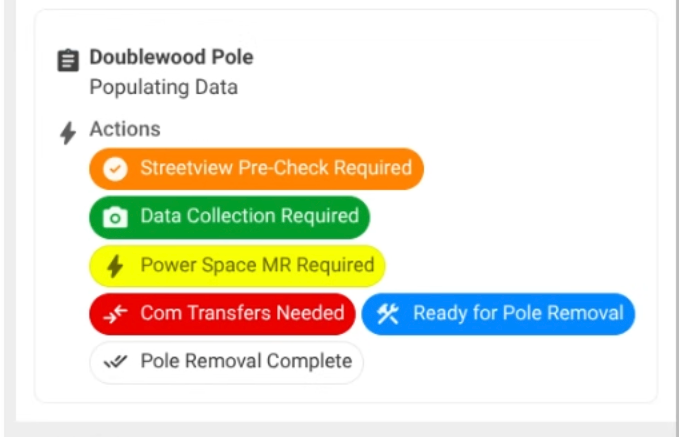
If a pole is an inherited double wood site and the basic conditions are unknown, desktop Street View pre-check lets clerical staff confirm conditions from the office. Most legacy double wood lists are padded with sites that were already resolved, never should have been flagged, or can't be confirmed without eyes on them. Pre-check purges a select few very quickly before anyone rolls a truck. On large backlogs, a third of the list can drop before field spend starts.
If a pole is a fresh replacement or a site that needs full inventory, rapid mobile data collection handles it. A solo field technician can rapidly assess the site to confirm the double wood status, outstanding transfers, and the conditions for upcoming transfers and stub removal. All that data is captured quickly with a photo and synced to the cloud in real time.
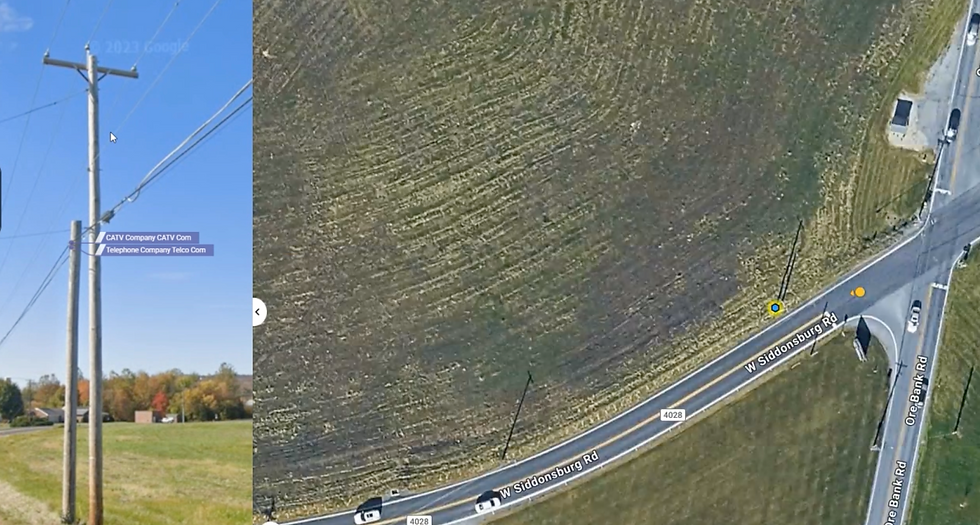
The workflow enforces what has to be true before the pole can advance, which means data quality problems get caught at the site, not at closeout.
Coordinate Transfers Three Ways
Transfer Management supports three coordination patterns, and most active programs use a combination.
Automated email notifications to attachers. When a pole enters a status that requires action from a specific attacher, the system can send that attacher an email (or a digestible summary) tied to the pole record, with the photo data they need to actually act. The schedule for follow-up notifications is configurable, so "it's your turn" does not quietly get lost in an inbox. When the attacher's work gets confirmed in the field, notifications stop. This addresses the data trust problem directly: attachers who have good data and scheduled reminders tend to move faster than attachers who have neither.
Single contractor assignment. On programs where coordinating across multiple attachers is the bottleneck, assigning every transfer to a single contractor who maintains construction agreements with multiple attachers collapses the coordination problem. The contractor has cross-attacher agreements so that there’s one crew, one visit, and every attachment gets moved. Transfer Management tracks the crew's work against each pole and advances the statuses as the work gets done.
Direct in-house team assignment. While less common, for programs that run transfers with their own crews, you can assign specific teams or users to specific statuses. You could have power transfers go to one team, comm transfer go to another, pole removal go to a third. Each team sees the poles that are currently ready for them on a map dashboard.
A single program can use all three patterns. Legacy backlog might get assigned to an single contractor with cross-attacher agreements for speed. Incoming fresh transfers might flow through automated notifications to attachers. Your own crews might handle pole removals. Transfer Management tracks all of it in the same workflow against the same pole records.
Close Each Pole With Proof
Pole removal gets its own status and its own verification. A mobile assessment (with a photo) is required to mark it complete, so "removed" actually means the pole is gone. Not pending, not probably. Gone. The date records itself. The audit trail closes with field evidence attached.
This sounds small until you audit a program that runs without it. Programs that close poles on paper without field verification tend to accumulate "removed" flags on poles that are still standing, which comes back to haunt you the next time somebody walks the line. The verification step is the thing that keeps the record matching the street across years of program operation.
Running pole transfer work right now? Transfer Management gives it a home. Legacy backlog and ongoing replacements, validated, routed, coordinated, and closed with proof. One system for the transfer function, not one per project.
Request a Demo | Learn More About Katapult Pro
How Transfer Management Fits With Existing Systems
The beauty of this workflow is that you can bring data in at any step. If you have a list of tickets that need to be validated to remove old, bad data from your next-to-go system, you can ingest those candidate locations into Katapult Pro and run them through this process.
If you are starting from scratch, you can use the integrated notification system to queue up transfers from attachers before removing the stubs across your footprint.
You can even create an extended make ready process that automatically places all pole replacement locations into a double wood resolution workflow after PCI.
What Changes When This Runs as an Ongoing Program
Transfer work on Transfer Management looks and feels different from transfer work run across four disconnected tools.
Program reporting stops being a weekly scramble. Dashboards pull live from the source, so the numbers leadership wants on Monday morning are already there on Sunday night. Because the dashboards lock records as read-only, the numbers stay trustworthy as the program runs over months and years.
Field crews and office staff work from the same record. When a crew marks a pole field-complete, the office sees it. When the office makes a closeout decision, the next assigned team sees what was decided. Nobody is reconciling versions.
Stub poles actually come down. The mobile verification required to close a pole is not paperwork; it's the thing that keeps the record and the street in sync across the life of the program.
Double wood stops accumulating. New replacements flow into the system as they happen, get managed from day one, and close before they can pile up as next year's backlog. The backlog number goes down as cleanup happens and does not get replenished from new stalls.
Pole Owners and the Teams That Support Them
Transfer Management is designed for both sides of a transfer program.
If you own the poles and run the program in-house, the workflow is your workflow. Your field crews collect. Your office manages status. Your joint use management team has one dashboard across every pole in transfer on your system.
If you own the poles and work with a contractor, the workflow is shared. Your contractor runs their fieldwork inside the same system you are watching. You see progress in real time, which means the weekly where-are-we call becomes a shared dashboard review.
If you're an engineering or construction firm running transfer work on behalf of a pole owner, Transfer Management gives your client a real window into the program. This is the model that lets your firm offer ongoing PMO-style transfer management as a service, not just one-time cleanup engagements. Your crews, PMs, and sub-contractors work in one system, and your client sees the same source of truth you're working from. Scope grows as transfer volume flows in. OSP firms providing engineering services as a project management office for pole owners get the tools to deliver the work at the quality their clients expect.
The Principles Behind the Configuration
A few principles shaped Transfer Management. They explain some of the design choices that might seem unusual if you are used to running transfers project-by-project.
The pole is the source of truth. Every record corresponds to a pole that exists. Statuses, attributes, and dates describe what is actually true about that pole. The system will not let you advance past conditions that have not been met.
Field reality changes system state. Marking a pole field-complete on the mobile app advances the workflow. The field crew's confirmation is the status change.
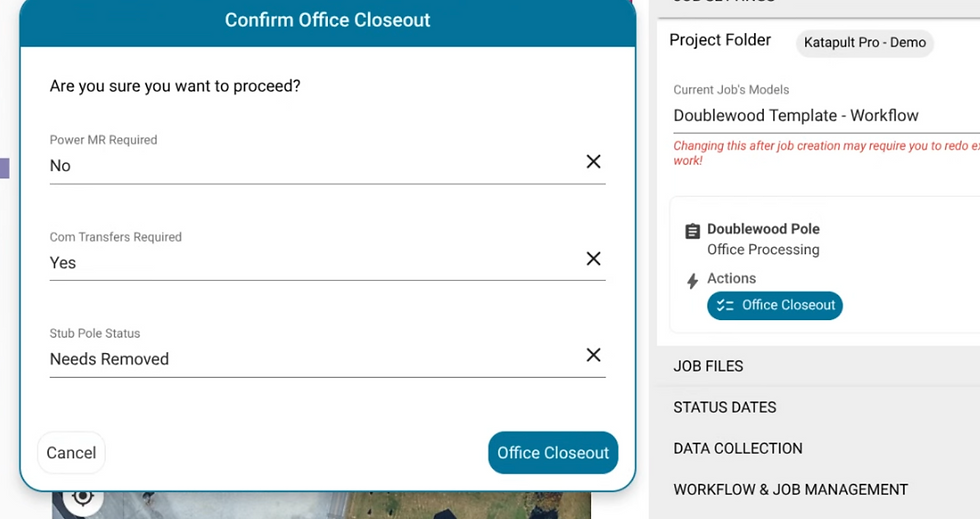
Closeout decisions drive the workflow. Three attributes answered at closeout (power, comm, pole status) determine which statuses come next and which are skipped. The workflow adapts to what the pole actually needs.
Guardrails are features. Refusing to advance a pole without a required photo feels like a pain the first time and saves three hours of rework the first time it catches a problem.
Dashboards stay trustworthy. The dashboard view uses locked attributes, which means nobody can edit a real pole record from a reporting view. That is the reason the numbers keep matching reality across months and years.
Who This Is For
Transfer Management is for any organization managing pole transfer work as an ongoing function. Electric utilities. Electric cooperatives. Joint use managers. And the engineering contractors hired to run transfer programs on their behalf. The configuration works whether the active program at any given moment is 500 poles or 50,000.
If you're currently running transfer work out of any combination that ends in "and a spreadsheet," this configuration is likely to cut weeks out of your program timeline and give you reporting you can defend to leadership across years, not just quarters.
Why Katapult Built This
Katapult Pro is built by an OSP engineering firm. We've been running pole attachment and transfer work for utilities for about a decade, which is where the practitioner DNA comes from.
Transfer Management exists because our own teams needed it. Running transfer programs out of ad-hoc tooling cost us time and cost our clients visibility. The workflow in this configuration is the workflow we wish we had years ago. It is shaped by how transfer programs actually run on the ground, which includes the parts that don't show up in slide decks. Our post on managing double wood with Katapult Pro workflows covers some of the thinking behind how the tool evolved.
Frequently Asked Questions About Transfer Management
Is Transfer Management a separate product from Katapult Pro?
No. Transfer Management is a configuration of Katapult Pro, which means it runs on the same platform, the same real-time cloud database, and the same mobile apps your team may already be using. Existing Katapult Pro customers can add Transfer Management without moving to a different system.
Can we really ingest thousands of candidate locations at once?
Yes. Transfer Management accepts candidate locations in bulk and creates one-pole jobs across the program at scale. This is how legacy double wood backlogs get ingested as a program rather than built one record at a time.
How do automated email notifications work?
When a pole enters a status that requires action from a specific attacher, the system can send that attacher an email tied to the pole record, with photo data included. The schedule for follow-ups is configurable. When the attacher's work gets confirmed in the field, notifications stop. These notifications coexist with any official notifications required through NJUNS or similar systems.
Does Transfer Management require any hardware?
No. Katapult Pro is cloud-based and runs on standard mobile devices in the field. If measurements are needed (not typical for double wood resolution), there is required equipment.
Is this a one-time project or an ongoing program?
Ongoing program. Transfer Management is designed to run continuously as the operations layer for pole transfer work. It supports one-time backlog cleanup engagements, but the larger value comes from running it as the permanent home for transfer work as poles keep getting replaced over time.
Ready to Run Transfers as Ongoing Work?
Transfer work does not have to be managed out of spreadsheets and email chains. Every pole going through a transfer lifecycle deserves a home, and every pole owner deserves a program they can defend to leadership across years.
We'll walk you through Transfer Management on your own program scope, whether that's clearing legacy backlog, managing transfers as they come in, or both. We can talk through how the configuration fits your organization, what the rollout looks like, and how setup works for your specific program.
Schedule a demo to see Transfer Management in motion.
.png?width=680&height=1008&name=pole-no-bg%20(1).png)